
Onboarding collaboration hub
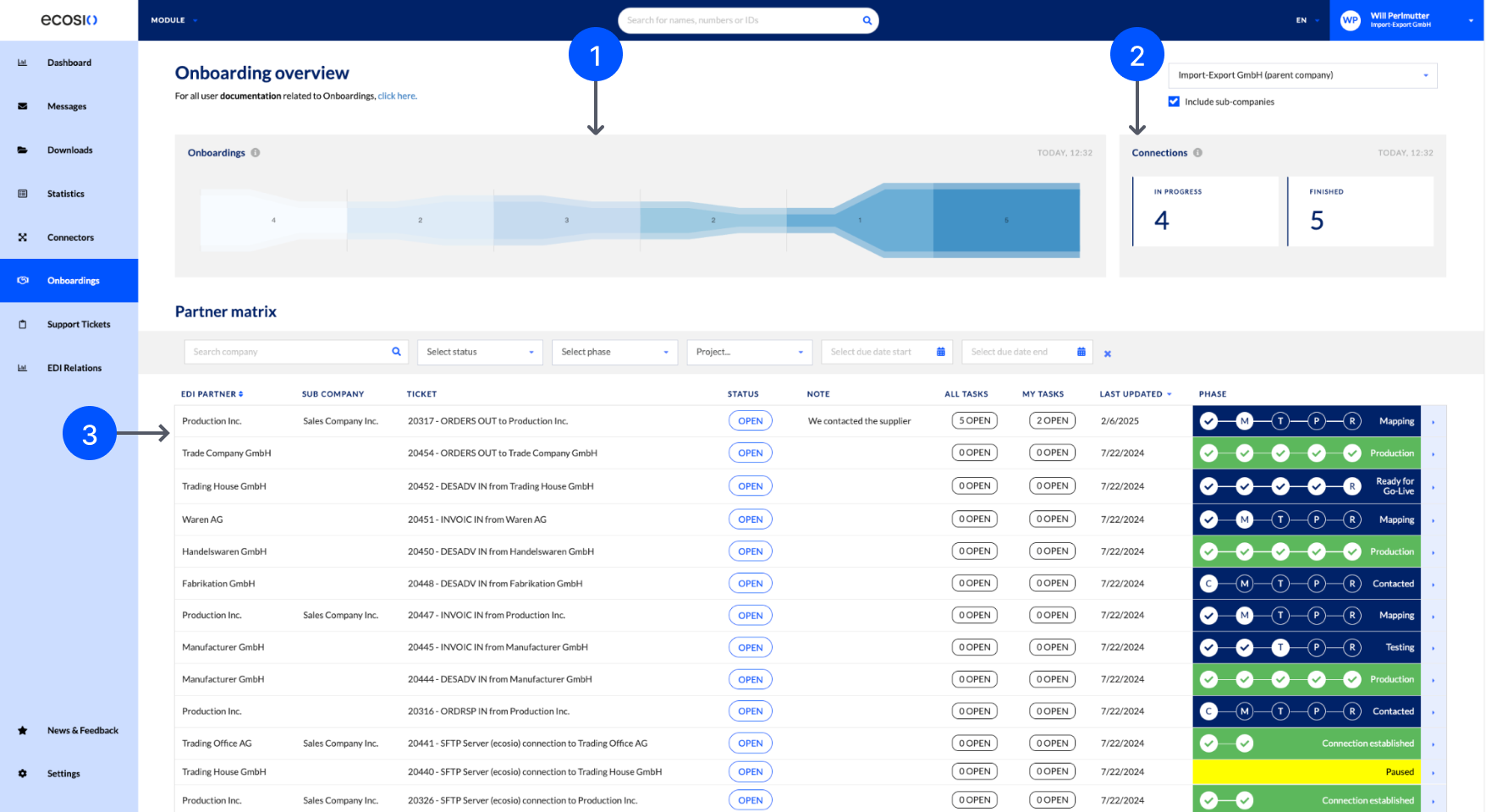
The Onboarding collaboration hub page displays your onboarding and connection tickets. Onboarding tickets manage the process of establishing new mappings for your EDI relations with your partners, whilst connection tickets manage the connection with the EDI partner or government platform, such as for compliance transactions.
ecosio creates these tickets following a request to your Integration Engineer. Within a ticket, you can use conversations to collaborate with ecosio and your colleagues.
Prerequisites
Before you can access the Onboarding collaboration hub page, you must:
- Confirm ecosio has set up the Onboarding collaboration hub and ticket details pages in your company’s Monitor.
- Have the Partner Matrix permission assigned.
- Be a member of a group.
Onboardings
The Onboardings chart displays a pipeline of all your onboarding and connection tickets and their current phase. You hover over the pipeline nodes to display the name of the phase it represents and the number of tickets within that phase.
Connections
The Connections section displays counts of your in progress and completed connection tickets. Completed connections with EDI partners are displayed on the Relations page. All other completed connections, such as those to government platforms for compliance transactions, are displayed on the Connectors page.
Partner matrix
The Partner matrix lists all your onboarding and connection tickets with the following details:
- EDI partner: The EDI partner the ticket is for.
- Sub company: The associated sub-company, if applicable.
- Ticket: The ticket's name, defined by ecosio. This name includes a reference number, message type, direction to or from, and the partner's company.
- Status: Whether the ticket is Open or Closed.
- Status detail: Any notes added to the ticket by ecosio.
- All conversations: The total number of open tasks for the ticket.
- My conversations: The number of open tasks assigned to you.
- Last updated: The date the ticket was last updated.
- Phase: The ticket’s current workflow stage.
Ticket phases
A ticket's phase varies depending on its type.
Onboarding ticket
The workflow for an onboarding ticket progresses through the following phases.
| Step | Phase Name | Description | Owner |
|---|---|---|---|
| 1 | Not started | An ecosio Integration Engineer created the ticket but work hasn't yet started. | ecosio |
| 2 | Contacted | An ecosio Integration Engineer has contacted you or the EDI partner to gather more information. | You or the EDI partner |
| 3 | Mapping | An ecosio Document Engineer creates and tests a mapping. A mapping converts file types, such as CSV or ERPEL, to an EDI standard format, such as EDIFACT or ANSI X12. | ecosio |
| 4 | Testing | ecosio has completed and tested the mapping. You and the EDI partner must now ensure that the outcome of the mapping is correct. A full end-to-end integration test can also be performed if requested. | You and the EDI partner |
| 5 | Parallel | You continue to send a paper or secondary format of the same messages or documents, such as fax, email, or post, for a specific period of time. In parallel, the EDI format of the same messages or documents is also exchanged via ecosio. When a certain percentage of content matches between the secondary and EDI format is reached, this phase is complete. This phase isn't always required. | You |
| 6 | Ready for go-live | The ticket is ready to go live, and ecosio is now waiting for you or the EDI partner to confirm a go-live date. | You or the EDI partner |
| 7 | Production | The ticket is complete. Further support and monitoring may be provided in some cases. | None |
Connection tickets
The workflow for a connection ticket progresses through the following phases.
| Step | Phase Name | Description | Owner |
|---|---|---|---|
| 1 | Not started | An ecosio Integration Engineer created the ticket but work hasn't yet started. | ecosio |
| 2 | Contacted | An ecosio Integration Engineer has contacted you or the EDI partner to gather more information. | You or the EDI partner |
| 3 | Connected | The ticket is complete. | None |
Updated 9 days ago