
Groups
Groups help you assign and mention multiple users in support tickets and in tickets in the Onboarding collaboration hub. This enables you to notify everyone within a group instead of mentioning multiple individuals.
The Groups tab in Company settings displays groups for the company where you have the Company admin permission and its sub-companies.
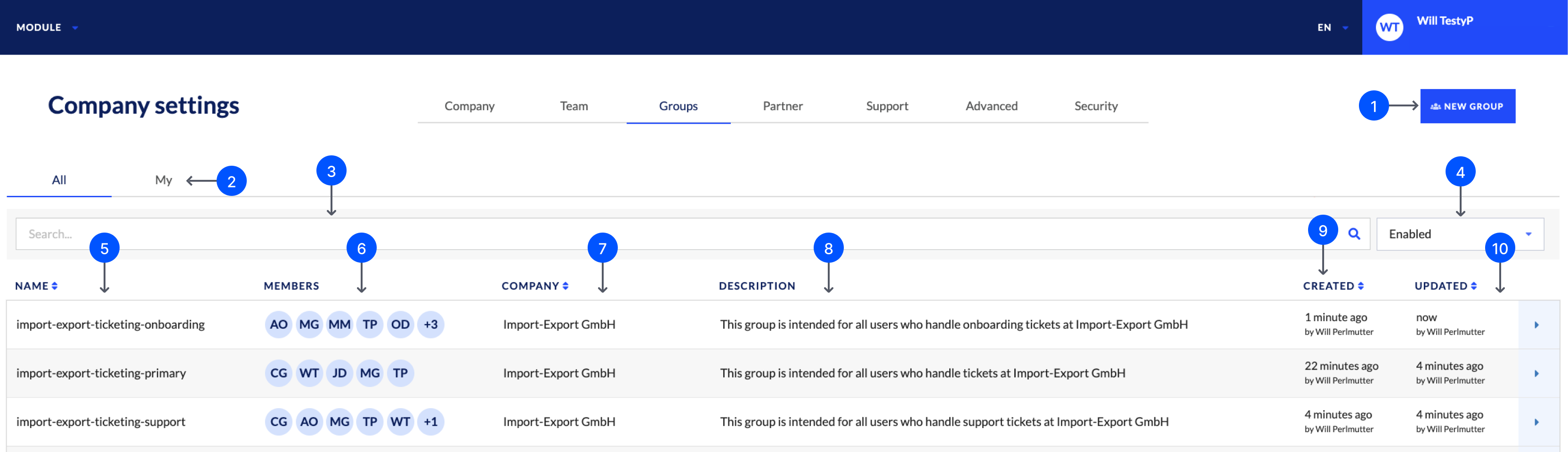
- New group: Create a new group.
- My tab: Display only groups you’re a member of.
- Search groups: Filter the displayed groups by group name.
- Enabled: Filter the displayed groups by enabled or disabled groups.
- Name: The name of the group.
- Members: The members of the group and their initials. Hover over a member to display their full name.
- Company: The company the group belongs to.
- Description: The description of the group.
- Created: The creation time and creator. Hover over the relative time to display the date and time.
- Updated: The last update time and editor. Hover over the relative time to display the date and time.
Updated 10 days ago
Did this page help you?