
Compliance for Croatia
Croatia requires three parallel processes for domestic B2B and B2G invoices: exchange, fiscalisation, and e‑reporting. Exchange delivers the invoice to the buyer. Fiscalisation sends signed messages to the Tax Administration to confirm invoice issuance and receipt in near real time. E‑reporting sends VAT‑relevant invoice data for follow‑on reporting such as rejections, payment reporting, and non‑issued invoices.
From 1 January 2026, Croatia expanded from B2G-only to a broader e-invoicing framework. Croatia uses the centralised Fina E-invoice (Servis e‑Račun za državu) platform for public sector B2G invoice exchange. For domestic invoicing, the model is decentralised, with invoices mainly exchanged, fiscalised, and reported via certified Information Intermediaries. VAT-registered taxpayers must fiscalise and report domestic B2B and B2G invoices to the Tax Administration. Croatia also provides MIKROeRAČUN for e‑invoice issuers and recipients that are not registered for VAT and are not public contracting authorities.
From 1 January 2027, non‑VAT taxpayers subject to income or corporate tax and additional public sector bodies must exchange e‑invoices and submit fiscalisation and e‑reporting for domestic transactions.
Document requirements
Both issuers and receivers must fiscalise and report invoices in parallel with e-invoice exchange for both B2B and B2G domestic flows. Exchange is decentralised and handled by one of the following parties:
- An Access Point, which provides secure transport and routing between the sender and recipient.
- An authorised Information Intermediary, which provides transport, validation, and transformation, and submits signed fiscalisation and e‑reporting messages to the Tax Administration.
- Fina E-invoice, which acts as an Information Intermediary for B2G invoices.
ecosio acts as a certified Information Intermediary for Croatia, authorised by the Tax Administration to enable e-invoice exchange, fiscalisation, and e-reporting services. Fiscalisation and e-reporting messages are accessed on FiskAplikacija via ePorezna.
Croatia compliance summary
Learn more about compliance transaction terms and concepts.
| Aspect | Description | Requirement |
|---|---|---|
| Invoices exchanged between businesses. | Mandatory exchange, fiscalisation, and e-reporting for domestic Extends on 1 January 2027 to non‑VAT taxpayers. | |
| Invoices issued by businesses to consumers. | Not mandated for e‑invoicing. | |
| Invoices issued by businesses to public administrations for public procurement. | Mandatory exchange, fiscalisation, and e-reporting. | |
| Electronic signature | Signature or seal rules for authenticity and integrity of e‑invoices. | Mandatory for fiscalisation using a certificate containing a Croatian VAT number (OIB). Optional for e-invoices. |
| Legal archiving | Minimum retention period for e‑invoices. | 11 years |
| Model | The e-invoicing flow model used by the country. | Decentralised exchange via Access Points or Information Intermediaries, plus near real‑time fiscalisation and e‑reporting to the Tax Administration. |
| Platform | The government-managed platform for e-invoicing. | Fina E-invoice for public administrations. Fiscalisation and e‑reporting via FiskAplikacija, accessed through ePorezna. MIKROeRAČUN for issuing, receiving, and fiscalising e-invoices aimed at a specific group of e-invoice recipients. |
| Supported format | The e-invoicing format legally required by the country. | |
| Automatic updates | Whether invoice status updates synchronise automatically in the Monitor. | Yes |
Format
E‑invoices must align with the EN 16931 standard and follow the country-specific CIUS known as HR-FISK 2.0. Custom validation rules beyond EN 16931 and HR-FISK 2.0 are not permitted.
From 1 June 2026, all monetary amounts submitted for domestic e‑invoice fiscalisation and payment status reporting must be stated exclusively in euros (€), regardless of the invoice’s original currency. Convert amounts to euros using the exchange rate prescribed in Article 36(2) of the Croatian VAT Act.
Information Intermediaries must support e‑invoice attachments up to 250 MB. Reference large supporting documents in the e‑invoice instead of embedding them in the XML.
For technical specifications, see the FiskAplikacija technical documentation. Fiscalisation and e‑reporting use local XML payloads submitted to the Tax Administration.
Invoice types
The Invoice Type Code must contain one of the following codes.
| Document | Code | Description |
|---|---|---|
| Commercial invoice | 380 | An invoice for goods or services from a seller to a buyer. |
| Corrective invoice | 384 | Used to correct or cancel a previously issued invoice. |
| Credit note | 381 | Used to correct amounts or settle a balance between a seller and a buyer. It is not required to provide a previous invoice reference. |
| Debit note | 383 | A document issued by a supplier to apply additional charges or increase the total value of a previously issued e-invoice. |
| Invoice for metered services | 82 | Charges based on measured consumption over a defined period. |
| Leasing invoice | 394 | Periodic charge for goods or services provided under a lease agreement. |
| Partial invoice | 326 | An invoice for a part of the total order or project value. |
| Prepayment invoice | 386 | An invoice claiming advance payment for goods or services. |
| Self‑billed credit note | 261 | An invoice process based on an agreement between a supplier and a buyer, where the buyer prepares the invoice and sends it to the supplier with the payment. |
| Self‑billed invoice | 389 | A credit note process based on an agreement between a supplier and a buyer, where the buyer prepares the credit note and sends it to the supplier. |
Automated e‑invoicing flow
ecosio automates domestic B2B and B2G e‑invoice exchange, fiscalisation, e‑reporting transmission, and status updates in the Monitor. Statuses include technical acknowledgements and government confirmations.
Accounts receivable flow
To enable ecosio to act as your Information Intermediary for the accounts receivable flow, you must accept ecosio as your certified provider in FiskAplikacija.
The following diagram and steps illustrate the AR process for B2B and B2G e‑invoices and the corresponding fiscalisation flows in Croatia.
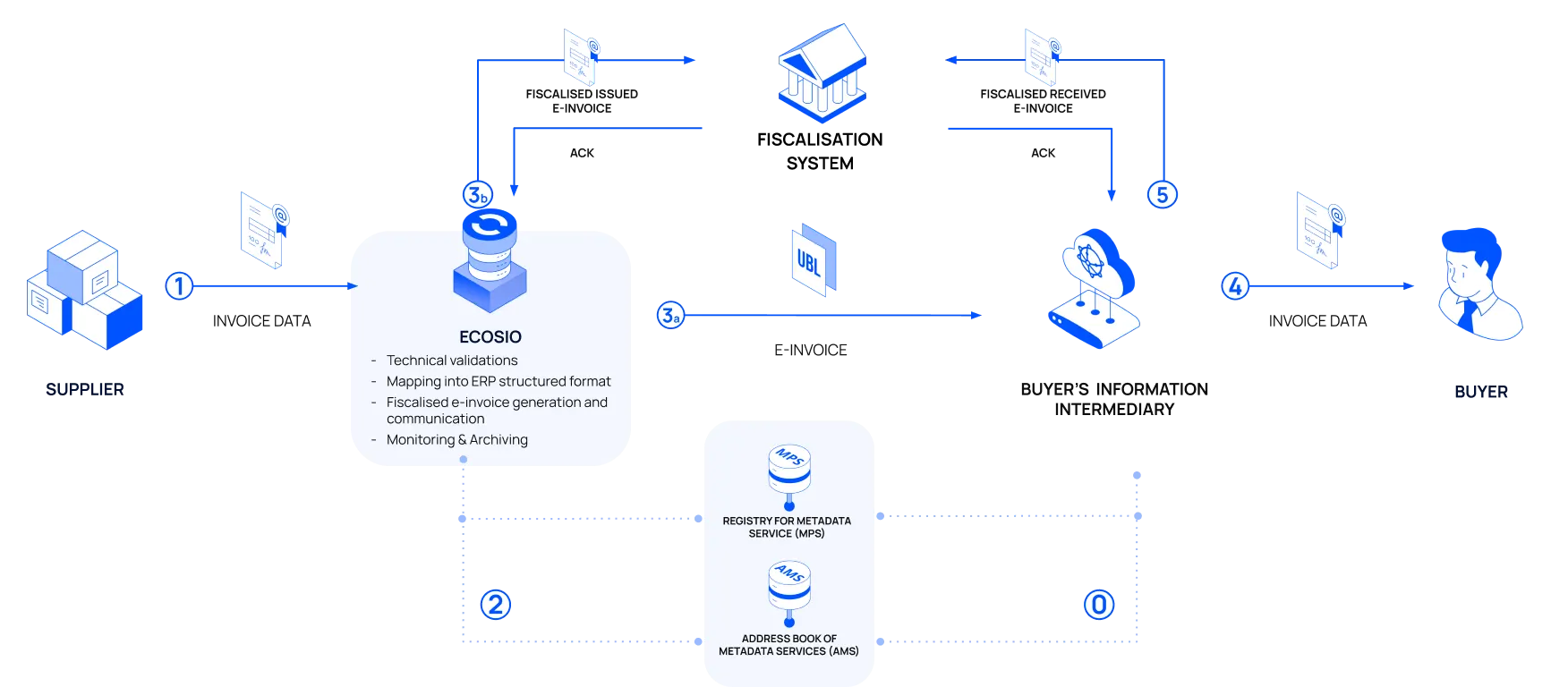
- You send the invoice data from your ERP or business software to ecosio in a structured format, such as VRBL, including the OIB of the buyer.
- ecosio carries out the following actions:
- Query the Metadata Service Directory (AMS), managed by the Ministry of Finance and Tax Administration, containing identifiers and related metadata services of taxable persons, to look up the buyer’s invoice address based on the OIB number in the e-invoice data.
- Convert the e-invoice to the Croatian UBL 2.1-compliant format.
- Validate the e-invoice against local requirements.
- ecosio sends the e-invoice to the recipient’s Information Intermediary. Once transmission is confirmed, ecosio extracts invoice data and, in near real time, generates and signs a fiscalised e‑invoice before sending it to the Tax Administration. ecosio receives an acknowledgement with an ID for the fiscalisation request.
- The buyer’s Information Intermediary makes the e-invoice available for the buyer to retrieve.
- The buyer reports the received e-invoice to the Tax Administration within five working days via its Information Intermediary. If the e-invoice is rejected, the buyer reports it to the Tax Administration by the 20th day of the following month.
Accounts payable flow
ecosio registers your organisation in the AMS using your OIB so e-invoices are discoverable and correctly routed. You must then accept ecosio as your certified provider in FiskAplikacija. This authorises ecosio to act as your Information Intermediary, enabling ecosio to automatically retrieve and integrate invoices into your system.
The following diagram and steps illustrate the AP process for B2B and B2G e‑invoices and the corresponding fiscalisation reporting in Croatia.
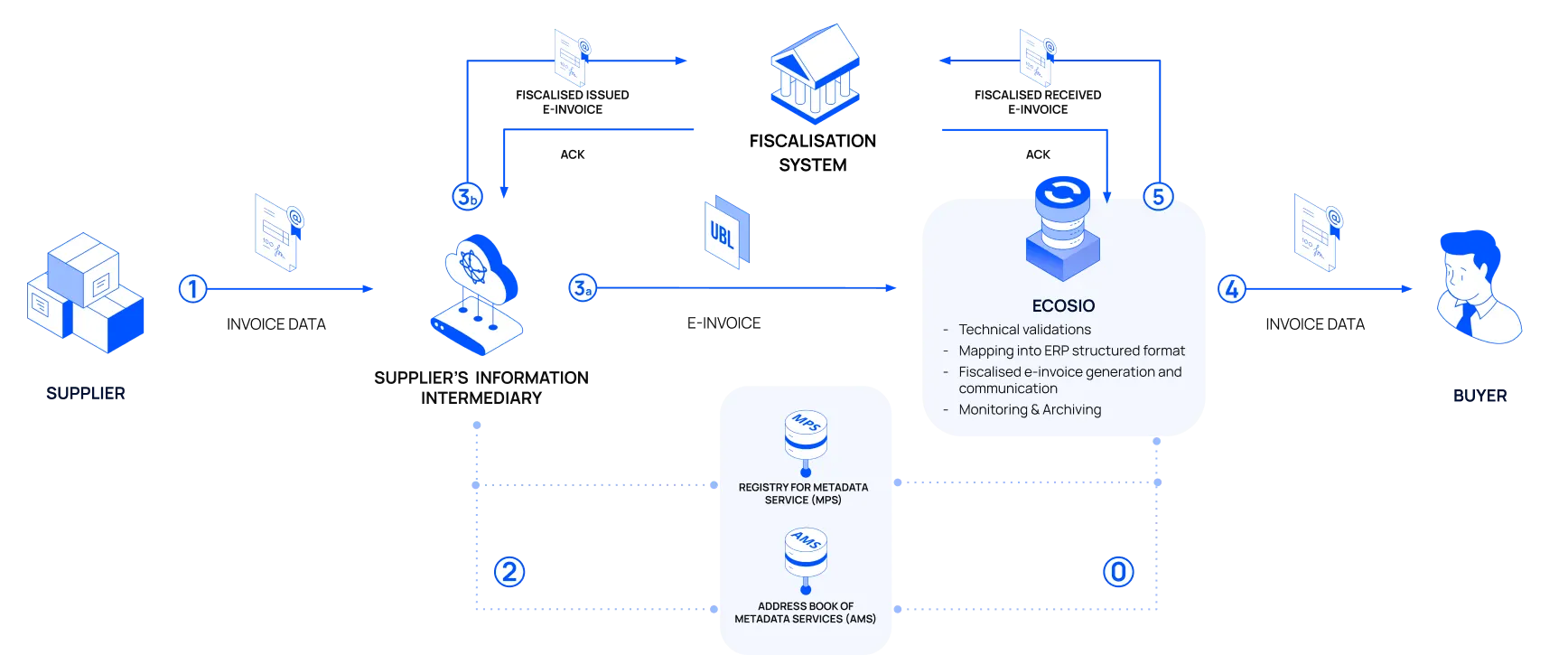
- The supplier sends the e-invoice to their Information Intermediary.
- The supplier’s Information Intermediary queries the AMS to determine ecosio as your Information Intermediary based on your OIB, converts the e-invoice to the Croatian UBL 2.1-compliant format, and validates it against local requirements.
- The supplier’s Information Intermediary sends the e-invoice to ecosio. Once the transmission is confirmed, the supplier’s Information Intermediary extracts part of the invoice data to generate a fiscalised e-invoice and sends it to the Tax Administration.
- ecosio validates the received e-invoice against local requirements and fiscalises the invoice data. ecosio then converts it to your ERP or business software’s format and sends it to your system.
- ecosio generates the fiscalised e-invoice and sends it to the Tax Administration within five working days. If the e-invoice is rejected, for example for non‑compliance, you provide ecosio with the list of rejected e-invoices by the 20th day of the following month. ecosio sends this data to the Tax Administration.
Automated e-reporting flow
E‑reporting complements e‑invoice exchange by sending VAT‑relevant data to the Tax Administration. It covers buyer rejections, payment reporting, and non-issued e-invoices. The following diagram illustrates the automated exchange of e-reporting data.
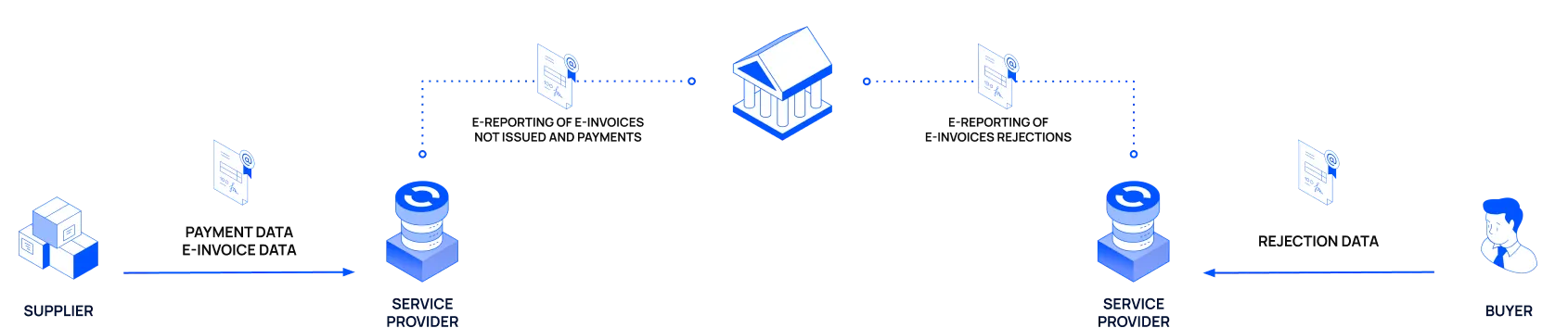
Rejections and payment reporting must be sent to the Tax Administration by the 20th of the following month.
Non-issued e-invoices can be reported in two ways:
- Automatic: When ecosio detects that an e‑invoice can't be issued to the receiving platform, for example the recipient is not in the AMS directory or is not ready, we automatically generate an e‑reporting flow. You are notified to issue a PDF or paper invoice to the buyer from your system..
- Manual: When an error is detected, ecosio sets the message status to Exceptions (customers) in the Monitor. Review the invoice, confirm the recipient details, then generate the e‑reporting flow from the Monitor and send the PDF or paper invoice from your system to the buyer.
Rejections and error handling
If a receiver rejects an e‑invoice for business reasons, they must notify the supplier using a UBL ApplicationResponse message. After this, they must also report the rejection to the Croatian Tax Administration through e-reporting, in line with Article 52 of the Fiscalisation Act.
The same message can be used for business acceptance if both parties agree. For technical details, see the application response specification.
To correct or cancel an invoice, the supplier can issue a corrective invoice or credit note. Under Article 43 of the Fiscalisation Act, the supplier can also resend the same e‑invoice with an invoice copy indicator for non‑tax‑impacting corrections as an alternative to cancelling and reissuing the invoice. This marks the invoice as a corrected copy without impacting tax.
Legal resources
The following official documents define the legal and technical framework for compliance transactions in Croatia.
-
Fiscalisation Act (OG 89/2025): Legal basis for fiscalisation and related legislation.
-
Regulation on e-Invoices (OG 11/2026, Doc. 88): Regulation detailing requirements for e-invoice exchange and fiscalisation under the Fiscalisation Act.
-
Act on Electronic Invoicing in Public Procurement (OG 94/18): Legal basis for mandatory B2G e‑invoicing.
-
Croatian VAT Act (Zakon o PDV‑u): Legal basis for e-invoices to be recognised for tax purposes.
-
Servis e‑Račun za državu (Fina E-invoice): Government B2G e‑invoicing platform information.
-
Porezna uprava: Tax Administration regulations and legal resources.
-
Fiscalisation Act FAQs: Official FAQ on the Fiscalisation Act, including e‑invoicing guidance.
-
FiskAplikacija Technical Documentation: Official technical documentation for e-invoicing using FiskAplikacija.
-
Instructions for Using FiskAplikacija: Official user guide for FiskAplikacija.
Updated 9 days ago